Amazon error: the product is not in the catalog when adding a SKU offer
Last verified: 2026-09-16 | Applies to: Seller Central, all marketplaces
What you are seeing
Section titled “What you are seeing”You try to add an offer for a SKU and Seller Central refuses it because the product is not in the catalog. Depending on where you are in the workflow, the backend shows one of two versions of the same message.
The short version, on the draft listing screen:
Your offer to the SKU cannot be added because the product is not in the catalog. Check your submission data to see if there are any …
That sentence then continues by telling you to correct the errors you find and resubmit. The tail of the message is not reproduced here verbatim because the public copies of it are truncated; the meaning is confirmed by the longer version below and by the translated text in non-English backends.
The longer version, which sellers quote from the backend on Amazon’s own seller forums:
…may be adding Offer-Listing(s) or editing a SKU not present in your catalog or one that’s been deleted. If this was a deleted SKU, wait 24 hours before resubmitting it. If you tried to add this SKU to the Amazon catalog before, check your data and correct any errors before resubmitting. If product is being added to a marketplace from another one, it may require few hours for localization before it is valid, please check your seller account for progress or any issues.
The failure usually looks like a half-built listing: the ASIN field is empty, the SKU field is filled in, and the product type is set. The same failure appears with translated text in non-English backends, with the same shape of broken record.
Why it happens
Section titled “Why it happens”Amazon defines the catalog as “the complete set of products that appear for sale in the Amazon store”, and there are only two ways in: create a new product listing from scratch, or match your offer to product pages already in the catalog.
This error means the system could not find a product record for your offer to attach to. There are three causes, and they call for different fixes, which is why resubmitting the same file usually changes nothing:
- The product record was never created. The SKU exists in your inventory, but the earlier upload that was supposed to create the product was rejected for a different reason, such as a missing attribute, a brand permission problem, or an invalid product ID. The catalog error is the symptom, not the cause.
- Your product ID does not match anything usable. Amazon’s guidance for product ID errors covers exactly this: you may be trying to create a new detail page for a product that is already listed, or the product ID you entered may be associated with a different product.
- The SKU is stale or already used. If you deleted this SKU earlier, the record is still in the way; if the SKU is already attached to another product, Amazon’s guidance is to delete the listing you started and recreate it with a unique SKU.
Step-by-step fix
Section titled “Step-by-step fix”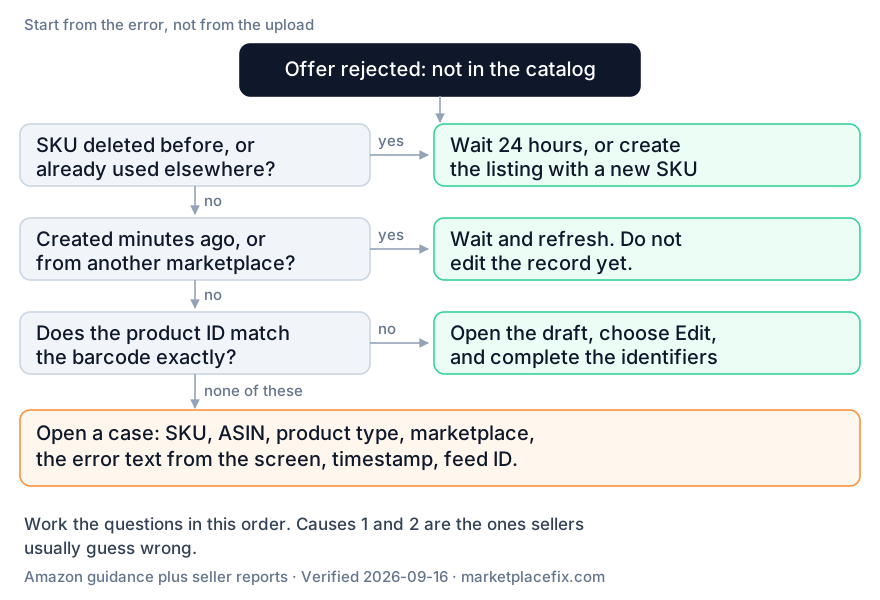
The order below matters. Two of the three causes look identical on screen, and the check that separates them takes under a minute.
Step 1 - find the error that actually blocked the product
Section titled “Step 1 - find the error that actually blocked the product”In Seller Central, open Inventory, then Manage All Inventory, and use the Listing status filter. Look for the SKU in question under incomplete or suppressed listings.
What to do: fix whatever that listing complains about first. Amazon’s Fix Your Products path for attribute conflicts is Inventory, Manage All Inventory, the Search Suppressed and Inactive Listings tab, Incomplete listings, then Accept Amazon’s Value for the conflicting attribute.
How you know it worked: the SKU no longer appears as incomplete or suppressed in that view.
Step 2 - prove the product ID
Section titled “Step 2 - prove the product ID”What to do: compare the product ID you submitted with the GTIN printed on the product’s barcode. Exact match matters; a digit transposed is enough to break it. If the error message suggests an ASIN and that ASIN is the product you are actually selling, put that ASIN in the Product ID field.
How you know it worked: the error message stops naming a different product, or the suggested ASIN turns out to be the one you are listing.
Seller-reported: if you already hold the ASIN for this product, open the draft, choose Edit, and complete the missing identifier fields there rather than resubmitting the same upload. The same sellers who report this also say that on a listing created only minutes earlier, waiting and refreshing beats editing, because the record may simply not have finished building.
Step 3 - if the suggestion is a different product
Section titled “Step 3 - if the suggestion is a different product”What to do: do not force the match. If the product ID belongs to something else, the offer cannot be attached to that page, and Seller Support is the next step rather than another resubmission.
How you know it worked: you either have the correct product ID for your item, or you have a case open that names both the ASIN and the product you are listing.
Step 4 - if you deleted this SKU before, or the SKU is already in use
Section titled “Step 4 - if you deleted this SKU before, or the SKU is already in use”What to do: stop resubmitting the same SKU. The backend text tells sellers to wait 24 hours before resubmitting a deleted SKU. If the SKU is already tied to another product, delete the draft listing and recreate it with a new, unique SKU.
How you know it worked: the new SKU is accepted and the offer appears in your inventory rather than in the draft list.
Step 5 - if the product is coming from another marketplace
Section titled “Step 5 - if the product is coming from another marketplace”What to do: the same message says localization from one marketplace to another can take a few hours before the product is valid in the target marketplace. Check the SKU creation progress in the target account before changing anything else.
How you know it worked: the listing shows up as active in the target marketplace, not merely as submitted.
Step 6 - if the listing was only created minutes ago
Section titled “Step 6 - if the listing was only created minutes ago”What to do: nothing yet. This is the most common false alarm on this error. Sellers answering the same question give the same two answers, refresh and check again, and if that fails, open a case rather than keep editing. That matches the backend text, which says a product being added to a marketplace can take a few hours to become valid.
How you know it worked: the listing turns active on its own, with no data change from you.
Step 7 - if a brand-new listing is stuck anyway
Section titled “Step 7 - if a brand-new listing is stuck anyway”Seller-reported: when the draft never resolves, building a fresh listing often produces a result faster than repairing the broken draft. Recreate it with a new SKU and the identifiers checked in Step 2.
How you know it worked: the new listing appears in inventory and not in the draft list.
If it still does not work
Section titled “If it still does not work”Open a case from Help, then Get help and resources, and include all of the following, because a case without the raw data tends to come back as a generic answer:
- the SKU, the ASIN if you have one, the product type, and the marketplace
- the exact error text, copied from the screen rather than retyped
- the date and time of the failed submission
- what you already changed, and what the result was
- the batch or feed ID if the listing came from a bulk upload
Ask explicitly which of the three causes applies, so the answer has to be specific.
Related problems
Section titled “Related problems”The same family of errors appears in other places, and the fixes are different:
- Brand name errors such as 5665 prevent the product record from being created in the first place, which then surfaces as this catalog error later.
- Listing errors that only affect visibility leave the product in the catalog but hide it from search.
- Account level problems can block listing creation entirely while looking like a listing error.
Sources
Section titled “Sources”- Amazon, “How to fix Amazon listing errors” (sell.amazon.com blog), checked 2026-09-16: catalog definition, product ID guidance, SKU guidance, Fix Your Products path, error codes 5461, 5664, 5665, 5882, 5885, 5886, 5887, and the Listing status filter procedure.
- Amazon Seller Forums discussion “Listings not being added”, checked 2026-09-16: verbatim long-form error text as quoted by a seller. Seller-reported, not an official help page.
- A seller post in a Chinese-language community and its comment thread, collected 2026-09-16, showing the identical failure with an empty ASIN field and a populated SKU, plus the two replies sellers gave there: complete the identifiers through Edit, or on a just-created listing wait and refresh. Used as a record of how the failure presents and what sellers tried; no wording taken from it.